The Privacy Settings Worth Changing on Every Device You Own
Jolene Nolan
July 24, 2026
Every smartphone, laptop, tablet, and smart device collects some amount of information. Some of that data is necessary to provide services you use every day, but many devices also gather information for analytics, advertising, or convenience features that you may not even realize are enabled.
The good news is that improving your privacy doesn’t require advanced technical knowledge. Spending just a few minutes reviewing a handful of important settings can significantly reduce the amount of personal information you share while making your accounts more secure.
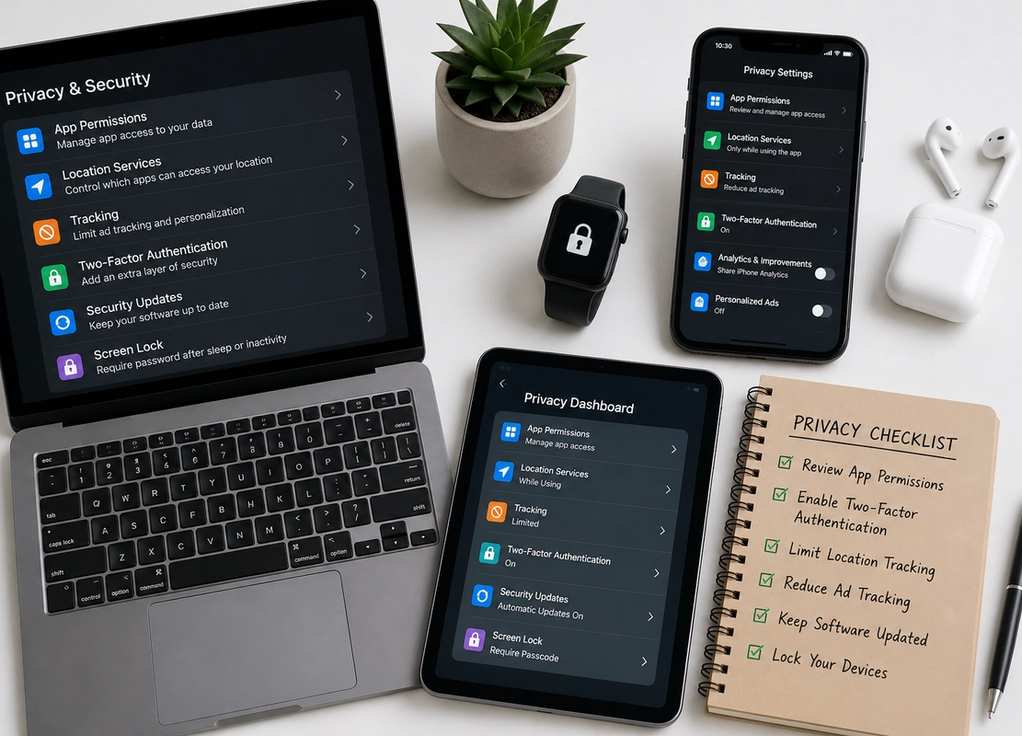
Review app permissions regularly
Many apps request access to your location, camera, microphone, contacts, photos, or calendar during setup.
While some permissions are necessary for the app to function, others may not be. Take a few minutes to review which permissions each app actually needs and disable any that seem unnecessary.
For example, a navigation app may need your location while you’re using it, but a simple calculator almost certainly doesn’t.
Checking permissions every few months helps ensure apps aren’t accessing more information than required.
Turn on two-factor authentication
One of the most effective security improvements you can make is enabling two-factor authentication, often called 2FA.
With 2FA, signing in requires both your password and a second form of verification, such as a code sent to your phone or generated by an authentication app. Even if someone discovers your password, this extra step makes it much harder for them to access your account.
Whenever available, enable two-factor authentication for important accounts such as email, banking, cloud storage, and social media.
This single setting dramatically improves account security.
Limit location tracking
Many devices and apps continuously collect location data.
Review your location settings and decide which apps genuinely need access. In many cases, selecting “Only While Using the App” provides the functionality you want without allowing continuous tracking in the background.
You should also periodically review which apps have recently accessed your location and remove access for those that no longer need it.
Sharing less location data helps improve your overall privacy without affecting everyday use.
Reduce advertising and tracking
Many devices include settings that allow advertisers to personalize ads based on your activity.
While these settings don’t eliminate advertising, disabling personalized tracking can reduce how much information is collected about your browsing habits across apps and websites.
Most operating systems and web browsers also provide options to limit cross-site tracking, block third-party cookies, or reduce personalized advertising.
These small adjustments can significantly improve your digital privacy over time.
Keep your software updated
Privacy and security depend on more than settings alone.
Software updates frequently include fixes for newly discovered security vulnerabilities. Delaying updates for weeks or months can leave your devices exposed to risks that have already been addressed by manufacturers.
Whenever practical, enable automatic updates for your operating system, browser, and frequently used apps.
Keeping your software current is one of the simplest ways to protect your personal information.
Lock your devices properly
Even the strongest online security won’t help if someone can easily access your device.
Use a strong passcode, fingerprint, or facial recognition to secure your smartphone, tablet, and computer. Set your devices to lock automatically after a short period of inactivity and enable features that allow you to locate or remotely erase a lost device.
These settings help protect your personal information if your device is lost or stolen.
Physical security is an important part of digital privacy.
Improving your privacy doesn’t require giving up technology or becoming an expert in cybersecurity. By reviewing app permissions, enabling two-factor authentication, limiting location tracking, reducing advertising data collection, keeping your software updated, and securing your devices with strong authentication, you can greatly improve your privacy with just a few simple changes. The goal isn’t to eliminate every possible risk—it’s to take practical steps that give you greater control over your personal information while continuing to enjoy the technology you use every day.