How to Spot a Phishing Email
Emely Pitts
July 24, 2026
Phishing emails are one of the most common types of online scams. They are designed to trick you into revealing passwords, financial information, or other sensitive data by pretending to come from a trusted company or person. Some phishing attempts are easy to recognize, while others are surprisingly convincing.
The good news is that learning a few warning signs can help you avoid becoming a victim. A moment of caution before clicking a link or opening an attachment can prevent significant financial loss and protect your personal information.
Watch for unexpected urgency
Phishing emails often try to create panic.
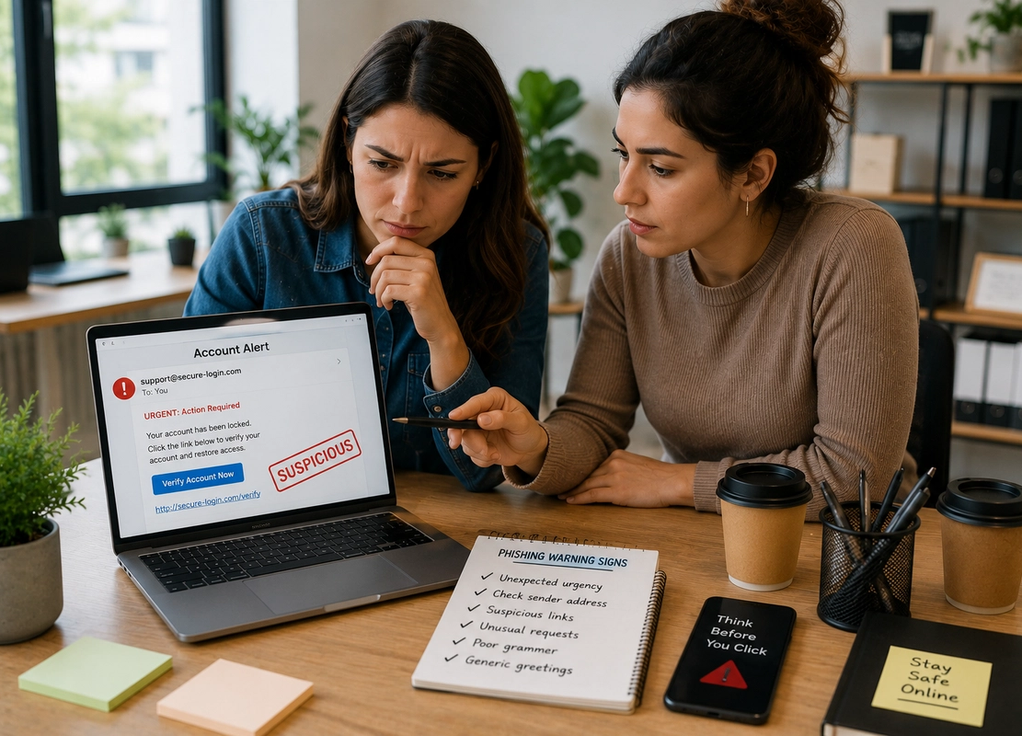
You may see messages claiming your account has been locked, your payment failed, or immediate action is required to avoid losing access to a service. These emails are designed to pressure you into acting quickly without taking time to think.
Legitimate companies may occasionally send urgent notifications, but they rarely demand immediate action through threatening language.
If an email makes you feel rushed, slow down and verify it before responding.
Check the sender’s email address
Scammers frequently imitate well-known companies, but the sender’s email address often reveals the deception.
At first glance, the name may appear familiar, yet the actual email address might contain extra letters, unusual spelling, or a domain that doesn’t belong to the company.
Before trusting any unexpected message, take a moment to inspect the full sender address rather than relying only on the display name.
Small differences can be a major warning sign.
Be cautious with links and attachments
Many phishing emails contain links that lead to fake websites designed to steal your login credentials.
Before clicking, hover your mouse over a link on a computer or carefully preview it on your mobile device to see where it actually leads. If the address looks unfamiliar or doesn’t match the organization’s official website, don’t click it.
Similarly, be cautious with unexpected attachments, especially if they ask you to enable macros, install software, or provide login information.
When in doubt, visit the company’s official website by typing the address into your browser instead of following the email link.
Look for unusual requests
Legitimate organizations generally won’t ask you to send passwords, one-time verification codes, credit card numbers, or other sensitive information by email.
Be especially cautious if someone asks you to purchase gift cards, transfer money urgently, change payment details, or provide confidential company information without following normal procedures.
Even if the message appears to come from your employer or a colleague, it’s worth confirming unusual requests through another communication method.
Scammers often rely on impersonation to gain trust.
Pay attention to the details
Although phishing emails have become more sophisticated, many still contain subtle inconsistencies.
Poor grammar, awkward wording, generic greetings such as “Dear Customer,” unexpected logos, inconsistent branding, or formatting errors may indicate that an email isn’t genuine.
These clues don’t always appear, but noticing several at once should encourage extra caution.
Trust your instincts if something feels unusual.
What to do if you’re unsure
If you’re uncertain whether an email is legitimate, don’t click any links or download attachments.
Instead, contact the company directly using information from its official website, log into your account through your browser rather than the email link, or speak with your organization’s IT department if the message relates to work.
If you accidentally click a suspicious link, change your password immediately, enable two-factor authentication if you haven’t already, and monitor your accounts for unusual activity.
Acting quickly can reduce the impact of a phishing attempt.
Phishing emails succeed because they take advantage of trust, curiosity, and urgency—not because people are careless. By slowing down, checking sender addresses, inspecting links, questioning unusual requests, paying attention to small details, and verifying suspicious messages through official channels, you can greatly reduce your risk of becoming a victim. In today’s digital world, a few extra seconds of caution are often the best defense against one of the internet’s most common scams.